How to make a online payment
Below are step-by-step instructions for paying your USSSA tournament entry fee online. Please follow each step carefully. If you run into any issues, reach out and I’ll be happy to help.
Log In
Go to www.usssa.com and sign in using your Team Manager ID and password.
Find Your Team
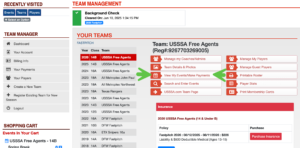
From your Team Manager Dashboard, locate the team making the payment and click “View My Events / Make Payments.”
Add to Cart
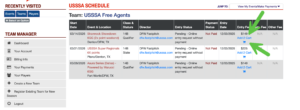
Find the event you want to pay for and click “Event Fee – Add to Cart.”
Review Your Cart
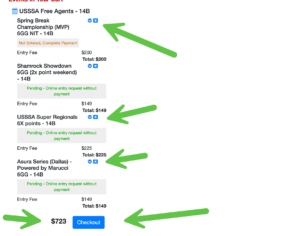
In the Shopping Cart, remove any events you do not want to pay for by clicking the X next to them. When ready, click “Checkout.”
Enter Payment Info
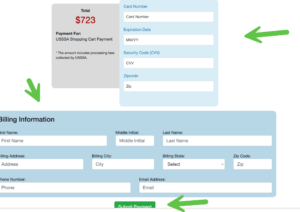
Enter your credit card and billing information, then click “Submit Payment.”
Save Your Confirmation
Once approved, a confirmation page will appear — print it or take a screenshot for your records.
Verify Your Status
After payment, your team will reflect as Paid/Approved on the USSSA website, subject to event capacity and director approval.